
Have you ever wondered how much you can profit when investing in Drip? We did, hence we came up with an article we like to share with you. And in this scenario we will invest 500 USD today into drip. How much can you earn within a year with such an investment? Lets calculate:
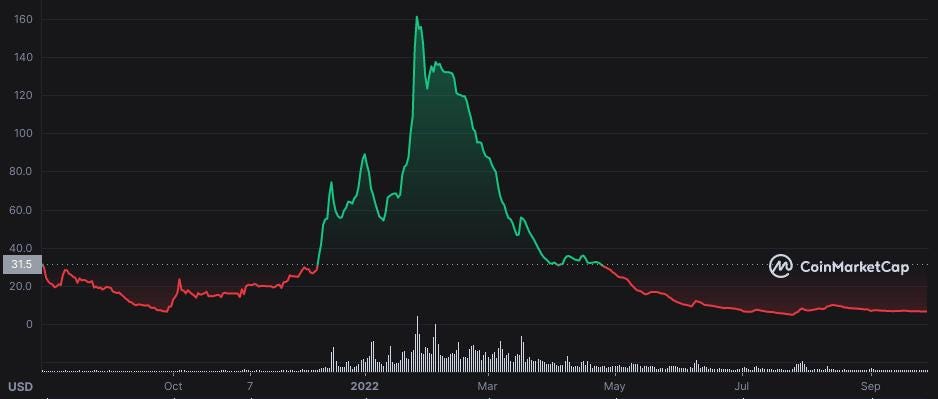
The price of a Drip token is currently around 6.50 USD. If you have a look at the overall price chart, you will spot that the highest price of it was 161 USD earlier in the year. As many other crypto currencies the Drip tokens price decreased heavily. So this is actually a great opportunity to buy!
So with today’s price you get 76.9 Drip tokens which you deposit in the Drip Faucet. After the deduction of the 10% tax you end up with 69.23 tokens in your faucet. That’s where you start earning your 1% daily reward.
Lets assume you compound every single day (although the difference is quite small if you don’t do that daily), you will end up with 169.5 Drips after 90 days. After 180 days you will have already 415 Drip tokens in your faucet. And if you keep on claiming for another 180 days, believe it or not, you will end up with 2'488 tokens. Amazing, isn’t it? This would allow you to withdraw almost 25 Drip tokens per day after a year.
Now the big question you will have, how much is that worth in Dollars? Guess that depends all on the development of the price of the token. Lets assume the following:
Drip falls down to 1 USD: You still have 2'488 USD worth of Drip tokens in your faucet and you can withdraw 24.60 USD on a daily basis. Still not bad for an initial investment of 500 USD, right?
Lets assume Drip stays as it is, around 6.50 USD: So the 2'488 tokens will with worth 16'177 USD and you can withdraw 160 USD every single day.
Now lets assume the Drip token goes back to the all time high (ATH) we saw back in January 2022 of 161 USD: Your investment would be worth 400'695 USD! And your daily withdraw option would be 3'967 USD. Again, all from an 500 USD investment done today and a small effort on a daily basis.
So how is this possible? Well, this is the power of the compound interest that is provided on a daily basis: The longer you compound the more you end up with. And the more you can then withdraw on a daily basis from your investment amount. Of course the price of the tokens needs to be a the right price point. Given the fact all crypto currencies lost in value, there seems to be quite some upward potential also in Drip. Lets compound and see.
Buddy/Team
Interested in joining the Drip Network aswell and looking for a buddy and/or a team, feel free to use the link below. You are very welcome to join:
Buddy address: 0xb3C253D80578f569cFd4fe2E916EDbF01B384577
Comments
Post a Comment